tl;dr
I built a Getting Things Done email workflow on Claude Code + Gmail MCP. It sorts through all the noise and lets me focus on the 3-5 new action items each day.
If you just want to copy my setup, skip to the resources section.
Why I built this
For years I've been an aspirational follower of David Allen's Getting Things Done methodology applied to email. I say "aspirational" because I found the actual sorting paperwork to be too tedious to stick to consistently.
I would go through phases. My inbox would grow to the point where I'd be motivated to get back into the GTD rhythm. I'd spend a bunch of time cleaning things up, feel good for about a week, and then get bored with the drudgery of the routine. My inbox would then get flooded again and I'd try not to think about it to avoid the guilt of being a bad knowledge worker.
Then AI came into the picture. This is what I had been waiting for all of my professional life: a bot that was trained on an unfathomable amount of human language to help me with my email. I wasn't sure how to set it up and I assumed that Gmail would build this directly into the inbox, so I waited patiently. Nothing launched. I don't know if Google is building this or not, but I lost patience and decided to spend a few days setting this up myself.
How I got it set up
In the fall of 2025, I tried to build an n8n workflow that sent my emails to OpenAI for labeling. The results weren't very good.
Then I started using Claude Code in my daily work, and I thought "Can this do my email?" I hadn't used Claude Desktop yet, which had just launched, but I was using Claude in the terminal every day so that's where I started.
MCP connector
"How do I connect Claude to Gmail?" I'm not sure when the official Gmail MCP connector launched, but that's not what I found at first. Claude was able to find this package, which was basically a wrapper around the Gmail API. I set up a private git repository, added this package via npm, and asked Claude to configure itself to connect to my inbox. It required setting up a small Google Cloud project to connect to Gmail. Why that's required is beyond me.
Permissions
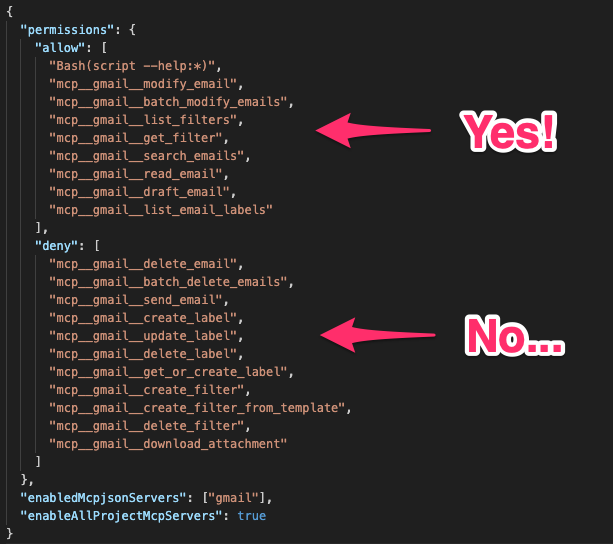
I was very concerned with what Claude could do on my behalf, so I studied the MCP permissions carefully. I configured every endpoint in the allow/deny list such that Claude could:
- Read all my emails and labels
- Change which emails had which labels
- Archive emails
- Draft emails
But Claude could not:
- Send emails
- Add/edit/delete labels
- Delete emails
This felt like the right balance of automation and safety. I still wanted to review and edit every email so it was written in my voice. I'm not AI-pilled enough that I want Claude sending emails for me.
Skills and rules
Once Claude could talk to Gmail via MCP, I asked it to build skills around David Allen's process. It created the following:
/inbox-zero: Label everything and clear out the inbox./action-review: Help me with all of the action items, including drafting replies./waiting-for-review: Review all of the threads where I'm waiting for a response./gtd: A combo skill, running the above three commands in order./weekly-review: The GTD weekly review to make sure nothing fell through the cracks.
I have 153 Gmail filters, but so many emails can't be sorted this way. I needed to build categorization rules for Claude based on real examples. I started slow, working through my inbox in small batches. Each time I would tell Claude where the emails should go and ask it to update CLAUDE.md with what it learned. After a few days, the automatic sorting process started working very well.
Context
Now that my rules were working well, I fully jumped into the process. The first time I ran /gtd, I had such a large backlog that it took several hours. I knew this was a one-time thing so I powered through. That was an intense session of handling email.
From that first session, I realized that the missing piece was company context. I needed to give Claude access to our:
- Company wiki
- Source code
- Customer support channel
- Task tracker
- Call recordings
Without this context, Claude had no idea what some of the emails were referring to. It was like a new employee who never went through company onboarding. Once it had this context, it was able to do a fantastic job with drafting responses and proposing next steps on just about everything. When it wasn't able to, I would update our company wiki.
Daily use
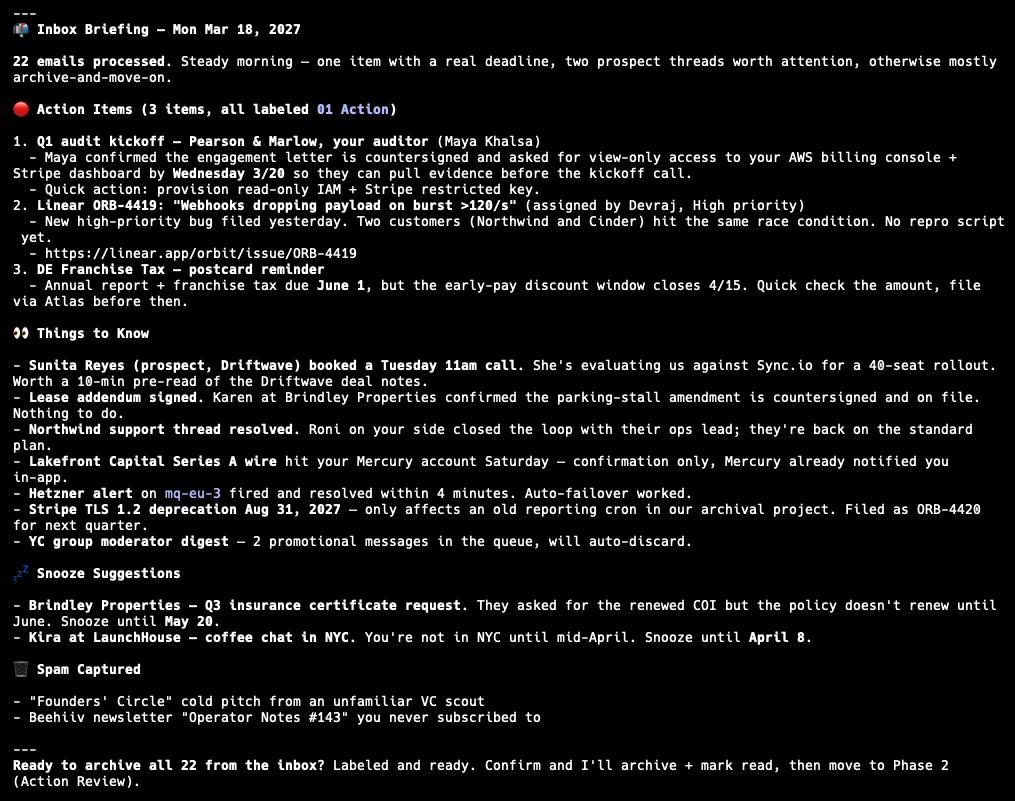
Finally, I started running /gtd every morning. It would summarize the important notifications in the inbox and leave me with only 3-5 new action item emails each day, things like customer questions, company admin tasks, important threads with vendors, etc. I was able to execute on the GTD process with only a few minutes each day, staying on top of everything in a way I had dreamed about.
The extra benefit of doing this with Claude Code was that, when I actually didn't know how to act on certain emails, Claude was right there to help brainstorm possibilities. It was like having an administrative assistant who was also a world-class expert on all subjects.
Here's an example of a morning briefing with /gtd (all of this data is fake, but this is what it looks like):
If you've dabbled with AI for email but haven't found an efficient workflow, I highly recommend giving this methodology a shot. My email guilt is gone.
Resources
- Getting Things Done (book)
- Gmail MCP, although Claude's native integration usually works when it's not overloaded
- Local settings with allow/deny list
- My CLAUDE.md with rules
- /inbox-zero skill
- /action-review skill
- /waiting-for-review skill
- /gtd skill
- /weekly-review skill