A full-stack field guide to building Shopify storefronts in 2026. It covers both the merchant decisions (which theme, which apps, when to migrate) and the developer implementation (architecture, performance budgets, accessibility) that produce fast, accessible, high-converting stores in the theme-blocks era.
The sourcing is Shopify's own developer documentation, the Shopify Help Center, the Summer '25 Edition announcement, and the Horizon theme source, with field research filling the gaps. Verify version-specific details (theme versions, app pricing, Theme Store thresholds) against shopify.dev at build time, because the platform moves with every Edition.
What is inside
A long guide deserves a map. The fifteen sections, in order:
- The 2026 picture in one minute
- Three theme architectures
- Choosing a theme (merchant)
- Theme architecture and structure (developer)
- Performance: the make-or-break
- Conversion and storefront UX
- SEO inside the theme
- Accessibility
- Integrating apps without wrecking the theme
- Developer workflow and tooling
- Headless and Hydrogen: when to leave the theme
- Migration playbook
- The 2026 best-practice checklist
- Dawn vs. Horizon: making the call
- Sources
1. The 2026 picture in one minute
The biggest change to Shopify themes since Online Store 2.0 landed in 2021 shipped in the Summer '25 Edition (May 21, 2025): a new theme architecture built around theme blocks, and a new default theme family called Horizon. If you are building, buying, or maintaining a Shopify storefront in 2026, this is the context that governs every decision below.
The five things that matter most this year:
- Theme blocks are the new architecture. Blocks are now defined at the theme level (in a
/blocksfolder), reusable across sections, and nestable up to 8 levels deep. This replaces the shallow, section-scoped block model of OS 2.0. - Horizon is the reference theme. A family of 10 free themes built on the new architecture, with AI-assisted block generation via Shopify Magic. Dawn is still excellent and still the canonical OS 2.0 reference, but new builds should start on the theme-blocks architecture.
- Performance is a gate, not a goal. The Theme Store rejects themes scoring below an average Lighthouse performance of 60, and Core Web Vitals move conversion and rankings directly. Build HTML and CSS first, treat JS as progressive enhancement, keep JS bundles at 16 KB or less.
- Accessibility is a build requirement. WCAG-aligned keyboard, contrast, and touch-target rules are baked into Shopify's theme guidelines and increasingly into legal exposure.
- App discipline protects everything else. The average store runs 6 apps; each unnecessary script adds 50 to 200 ms and chips at conversion. Use app blocks and embeds, not hand-injected scripts.
2. Three theme architectures
Every Shopify theme falls into one of three architecture versions. Knowing which one you (or your client) are on determines what is possible without code, which tutorials apply, and whether an app feature will work.
| Architecture | What it means | Status in 2026 |
|---|---|---|
| Vintage | Original architecture. Sectioned or non-sectioned. No JSON templates, no app blocks, no dynamic sources. | Legacy. Not sold in the Theme Store. Shopify's free vintage themes get security fixes only. Migrate off. |
| Online Store 2.0 | Sections on every page, JSON templates, section groups, dynamic sources, app blocks and embeds. Dawn is the canonical example. | Mature and fully supported. A safe, fast baseline. Block nesting is shallow (section-scoped). |
| Theme blocks (newest) | Everything OS 2.0 has, plus theme-level reusable blocks, deep nesting, group blocks, and static blocks. The Horizon family lives here. | The current default and the target for new builds. Most advanced customization surface. |
How to check a store's version. Open Online Store → Themes → Edit theme, select the Default product template, and look below the section list. An Add section button means you have sections-on-every-page (OS 2.0 or newer). For theme blocks, look for a
/blocksdirectory in the code editor and theme-level block support in the editor's block picker.
What theme blocks unlock
In OS 2.0, a block could only be used inside the single section that defined it. Theme blocks are defined once at the theme level and reused anywhere, and, critically, they can contain other blocks. In Horizon, a "Product card" block can hold an "Image" block, a "Group" block, and a "Rating" block, all configurable in the editor and nestable up to eight levels. Group blocks bundle related elements (a heading plus product grid plus banner) into one reusable unit, and global or static blocks let a change propagate across the whole store. This is what makes the editor feel like a real page builder without a third-party app.
3. Choosing a theme (merchant)
For merchants. The right starting point in 2026 is almost always a free, well-maintained theme on the newest architecture. You can go a long way before a paid theme earns its price.
| Theme | Cost | Use it when |
|---|---|---|
| Horizon (family of 10) | Free | New stores and rebuilds. Newest architecture, theme blocks, AI block generation, strong performance defaults. Start here. |
| Dawn | Free | You want the simplest, most battle-tested OS 2.0 base, or you are following older Dawn-based tutorials. Still the canonical performance reference. |
| Studio / Origin / Refresh / Sense | Free | Design-forward free alternatives when Horizon and Dawn do not fit the brand out of the box. |
| Impulse (Archetype), Prestige (Maestrooo) | Paid (one-time) | Later, when you need a premium feel or specific merchandising features and have revenue to justify it. Not a day-one purchase. |
Selection criteria that predict success
- Architecture version. Prefer theme blocks; never buy a new vintage theme.
- Purpose fit. Shopify's own guidance is that specialized, opinionated themes outperform generic ones. Pick a theme whose default layout matches what you sell and who you sell to, rather than a "does everything" theme you will fight.
- Performance out of the box. Run the theme's demo through Lighthouse (mobile) before committing.
- Maintenance. Is it actively updated? Check the theme's version history and release notes.
- App-block support. Confirm the sections you care about accept app blocks if you will need reviews, upsells, and the like.
Don't install themes from outside the Shopify Theme Store. Off-store themes are not vetted for quality or compatibility, may lack JSON templates for some page types, and can break core features. The one exception is a purpose-built custom theme from a developer you trust.
4. Theme architecture and structure (developer)
For developers. Good theme architecture is about giving merchants the right amount of flexibility: enough to express a brand, not so much that the editor becomes a junk drawer. The structural unit decisions (template vs. section vs. block) are the highest-impact choices you make.
Templates, sections, blocks
These guidelines assume OS 2.0 or newer (JSON templates and section groups). You cannot add or remove static sections from Liquid layouts; the customizable surface lives in JSON.
- Sections are for adding, removing, or reordering content at the template or section-group level. Always make a template's default content available in a main section that can be moved.
- Blocks are for add, remove, and reorder within a section. Scope each block's settings to the block. Choose a layout that flows logically regardless of block type or order; never rely on a specific block sequence to achieve a layout.
- Granularity is a trap. Group author plus date plus comments into one block or a settings group, not three blocks. Too many blocks creates clutter and complexity for both the code and the merchant.
Theme blocks (the 2026 model)
Theme blocks are Liquid files in the theme's /blocks folder. They are reusable across sections and nestable, unlike section-defined blocks.
/blocks/text.liquid                       (a theme-level, reusable block)
{% schema %} ... {% endschema %}          (settings, presets, nested blocks)
{% stylesheet %} ... {% endstylesheet %}  (auto-subset per render tree)

# A section opts in to ALL theme blocks:
"blocks": [{ "type": "@theme" }, { "type": "@app" }]

# And renders them in stored order:
{% content_for 'blocks' %}
Key rules to internalize:
- A section can define blocks locally or opt in to theme blocks via
@theme, not both at once. - Theme blocks reference their own
blockobject and can read the parentsectionobject and global objects, but cannot access variables created outside the block or be passed variables like a snippet. Design them as self-contained. - Presets make a block appear in the editor's block picker. A block can ship multiple presets, and presets can pre-nest child blocks (for example, a "Group" block whose "Column" preset contains two "Text" blocks).
- Use block targeting to restrict which blocks a section accepts, and static blocks for stricter layout control when free-form nesting would break the design.
- Forking Horizon? Modularize your changes, reuse snippets, and avoid editing Shopify's animated components unless you understand them. Keep visual logic out of bloated templates.
Metafields and metaobjects as first-class content
Connect settings to dynamic sources, meaning resource attributes and metafields, so a block reflects the product or page it renders in. Build purpose-specific blocks for standard metafields (size chart, care guide, ingredient or origin lists). Audit competitor PDPs in your target vertical and design components around the structured content they present. This keeps merchandising data out of free-text descriptions and reusable across the catalog.
5. Performance: the make-or-break
Performance is the area where theme quality is most measurable and most consequential. It moves conversion, repeat purchase, and search rankings, and it is an explicit gate for the Theme Store.
Core Web Vitals: 2026 "good" thresholds
| Metric | Target |
|---|---|
| LCP (load) | ≤ 2.5 s |
| INP (interactivity) | ≤ 200 ms |
| CLS (visual stability) | ≤ 0.1 |
INP replaced FID as a Core Web Vital in 2024. Interaction latency now counts, so heavy JavaScript is penalized twice.
The Theme Store speed score
A theme must average a Lighthouse performance score of 60 or higher across home, product, and collection pages to be accepted. Shopify weights them:
[(p × 31) + (c × 33) + (h × 13)] / 77
Here p = product, c = collection, h = home (mobile scores). Use the median of several runs.
JavaScript discipline
- Build HTML and CSS first. JS should never be required for core functionality (finding or buying products). Use it only as progressive enhancement where no HTML or CSS solution exists. CSS parses and renders far faster than JS.
- Keep the minified JS bundle at 16 KB or less. Shopify minifies automatically; your job is to ship less.
- Avoid frameworks and big libraries. React, Angular, Vue, and jQuery all carry real performance cost in a theme. Prefer native browser features and modern DOM APIs. Skip polyfills for browsers that do not support async/await.
- No parser-blocking scripts. Always use
deferorasync. Wrap injected scripts in an IIFE to avoid global namespace collisions (minifiers rename variables and can collide). - Load on interaction. For components that are not always used, use an import-on-interaction pattern instead of loading, parsing, and executing upfront.
Asset and rendering discipline
- Lazy-load below-the-fold images with
loading: 'lazy'via theimage_tagfilter. Never lazy-load above-the-fold or LCP imagery; treat it as critical. - Use responsive images.
image_urlplusimage_tagemits a smartsrcset; tune it with thesizesargument so the smallest adequate image is downloaded. - Preload sparingly. Two resource hints per template at most (
preload_tag, or thepreloadargument onstylesheet_tagandimage_tag). Reserve them for render-blocking, above-the-fold assets. - Prefer system fonts to avoid a blocking font download before text renders.
- Host assets on the Shopify CDN (the theme
/assetsfolder) so HTTP/2 prioritization can do its job; avoid extra third-party connections. - Respect CSS subsetting. Shopify subsets CSS from
{% stylesheet %}tags per page render tree. Keep each file's classes used only within that file or files it renders, or styles go missing. - Tune Liquid. Do expensive work (for example, sorting a collection) once before a loop, not inside it. Use the Shopify Theme Inspector for Chrome to find slow Liquid lines.
How to test like Shopify does
- Theme Check. Static analysis for large JS and CSS bundles, remote assets, parser-blocking JS, and cross-file CSS dependencies.
- Lighthouse (mobile) on a clean dev store using the test-product CSV and a
?pb=0preview URL, then apply the weighted formula above. - Lighthouse CI. The Shopify Lighthouse CI GitHub Action uploads your theme to a benchmark shop and scores every change, catching regressions before merge.
- Web Performance Dashboard and Reports. Real-user-monitoring CWV data for live stores; the truest signal once you have traffic. Lighthouse is the stand-in for low-traffic shops.
The app-bloat tax is a theme performance problem. The average merchant installs 6 apps, and review widgets, page builders, and chat apps are the most-cited speed killers. Each unnecessary script tag adds roughly 50 to 200 ms. Budget apps as strictly as you budget your own JavaScript (see section 9).
6. Conversion and storefront UX
A fast theme that does not convert is still a failure. These are the storefront patterns that consistently earn their place, useful to both the developer shipping defaults and the merchant configuring them.
Layout fundamentals
- Mobile-first, always. The large majority of storefront traffic is mobile; design and test there first.
- One hero, no carousel. A single, decisive above-the-fold message. No autoplaying video hero on mobile (it tanks LCP and data usage).
- Touch targets of 44×44 px or larger for primary controls (menu, add-to-cart, variant pickers, modal close).
The product page (PDP) checklist
Order matters. A high-converting PDP presents, roughly top to bottom: 5 or more images (front, back, on-model, print or detail close-up, lifestyle); a body-measurement size chart with a fit note; a spec callout; care instructions; fulfillment or print-method disclosure where relevant; shipping ETA visible above add-to-cart; reviews below the fold; a two to three item cross-sell; and an FAQ accordion answering the top objections (shipping, returns, sizing). Dynamic variant changes (price, availability) must update for screen readers, not just visually (see section 8).
Navigation and checkout
- Keep the nav under about 8 items. Mega-menus only past around 50 SKUs. Do not over-categorize.
- Don't customize checkout unless on Plus. Shopify's one-page checkout is the highest-converting in the world; leave it alone.
- Turn on Shop Pay day one (and Apple Pay, Google Pay, PayPal, and installments). Accelerated wallets are among the largest single conversion levers available.
Trust-eroding patterns to avoid: fake-scarcity stock countdowns, multiple FOMO timers, wheel-of-fortune pop-ups, and redundant currency converters (Shopify Markets handles currency natively). These depress conversion at the premium end and add script weight.
Seven storefronts worth studying
Principles are easier to trust when you can see them shipped. Here are seven Shopify stores, captured June 2026, that get the fundamentals above right. All seven run on Shopify. Most are bespoke themes, but Quiet Town is a customized Dawn, proof that the free reference theme can carry a distinctive, beautifully art-directed brand. Click any screenshot to open the live store.
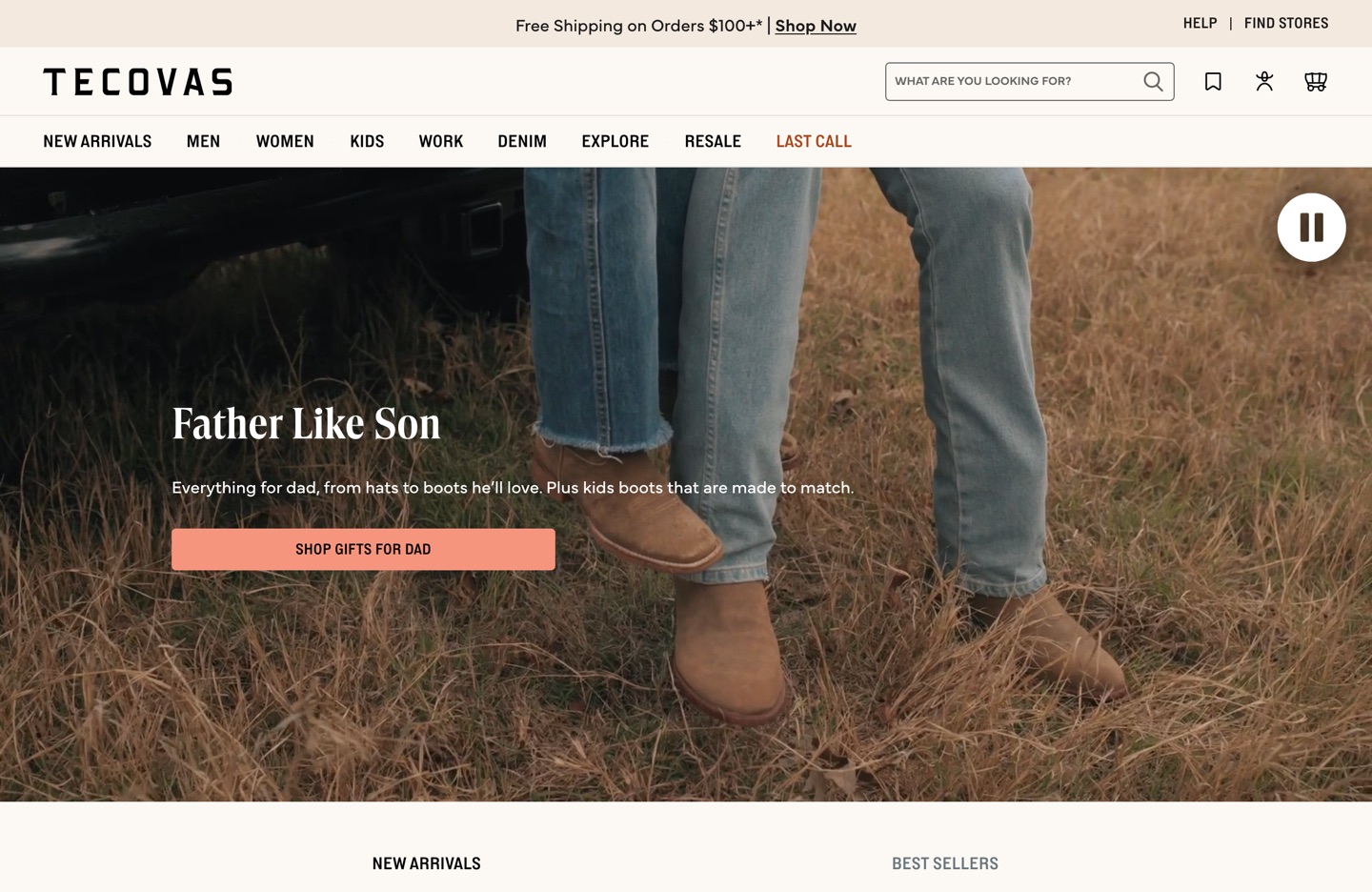
Tecovas — One decisive hero ("Father Like Son") over a full-bleed lifestyle photo, no carousel, with a tight top-level nav and a visible shipping-threshold bar. A textbook take on the layout fundamentals above, on a custom theme.

Vacation — Personality as conversion. The homepage commits to one '80s-leisure idea, with the rating and review count (4.8 / 5 across nearly 11,000 reviews) sitting right under a single, unmissable hero and CTA. A fast, simple layout leaves all the room you need for brand.
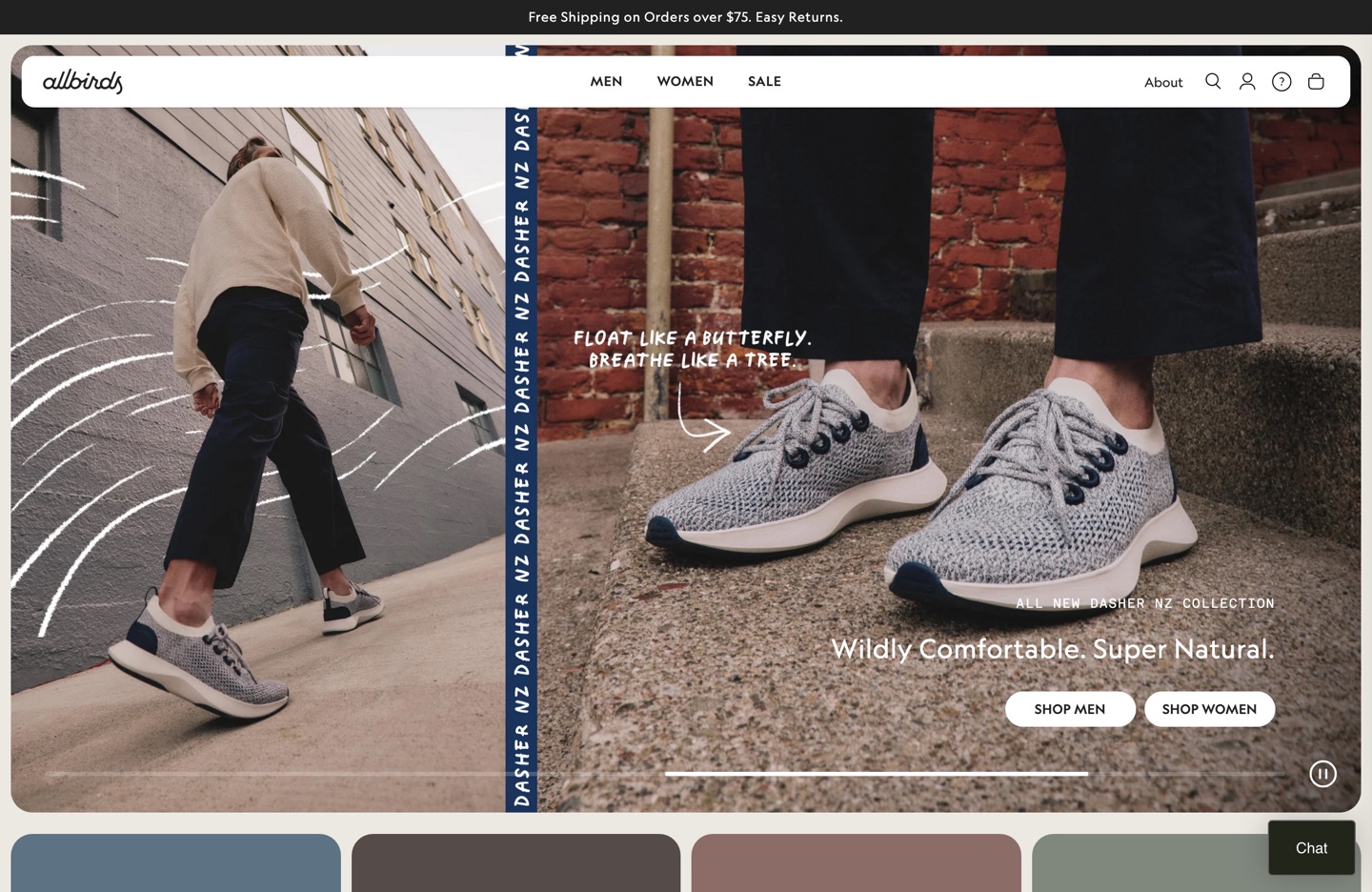
Allbirds — A split hero that is product-first and message-light, foregrounding the shoe and a single sustainability line. A clean study in merchandising the product above the fold without a slider.

Sabai — Watch the band of trust signals directly under the hero (FSC-certified, PFAS-free, made in the USA, B Corp). For considered, higher-ticket purchases, surfacing proof early is the conversion move, done here without a single fake-scarcity timer.
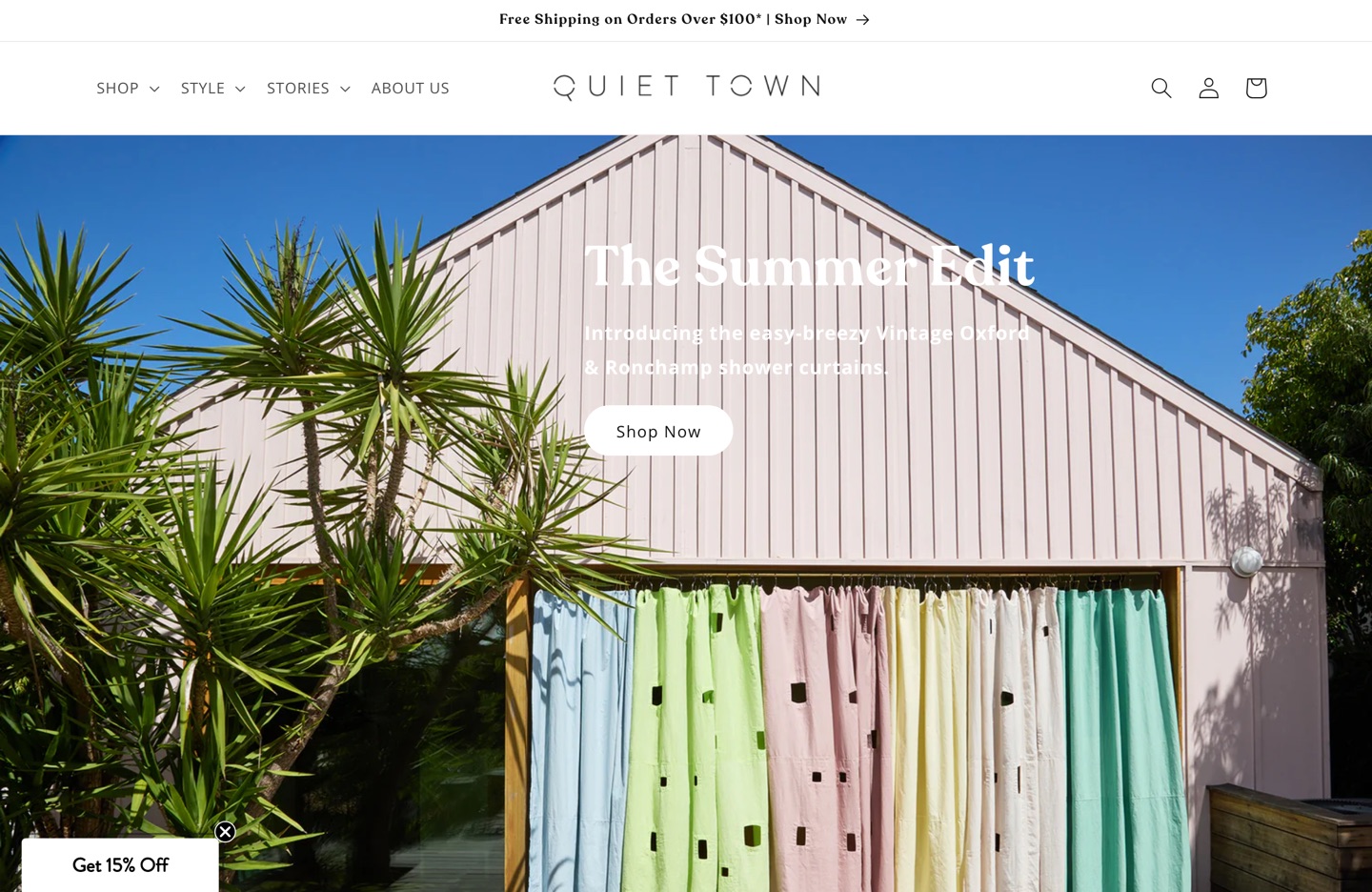
Quiet Town — The Dawn store on the list. Editorial photography, restrained type, and an eight-item nav turn the free reference theme into something that reads as bespoke. If you are wondering how far Dawn can go, this is the answer.
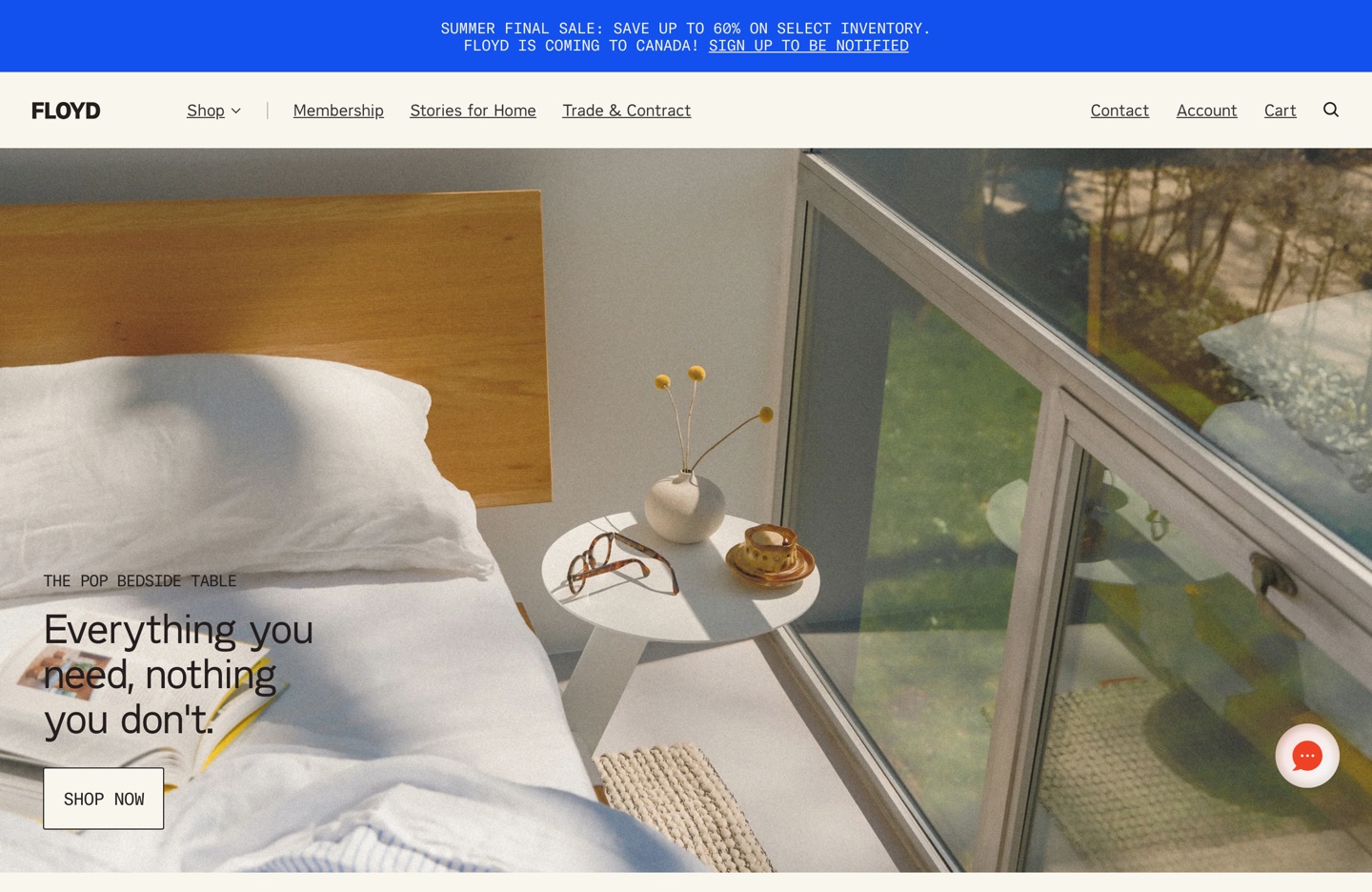
Floyd — "Everything you need, nothing you don't," and the storefront practices it: a calm single hero, a lean nav with clear Trade and Membership entry points, and warm lifestyle imagery doing the selling. Custom theme, restrained execution.

Albany Park — Leads with the offer ("Make It Yours," free swatches, white-glove delivery) above the fold, two clear CTAs, and value props stacked beside the hero. A clean example of putting the purchase-deciding details (fabric, delivery, samples) front and center for a furniture buyer.
7. SEO inside the theme
Shopify gets a lot right by default: auto sitemaps, canonical tags, WebP conversion, SSL, fast hosting, and automatic redirects on handle changes. But several SEO outcomes are decided in theme code, which makes them a theme best-practice topic.
The duplicate-URL problem (and the one-line fix)
When a product belongs to multiple collections, Shopify exposes it at several paths (/products/x plus /collections/*/products/x). Canonicals point to the clean URL correctly, but by default collection pages link internally to the collection-scoped path, so most internal link equity flows to the non-canonical URL. The fix lives in the collection template: remove the within: collection parameter from the product link so internal links target /products/[handle] directly. This is a theme edit and is never done automatically.
Structured data and metadata
- Default themes ship basic Product schema. Full
AggregateRatingandOfferschema needs theme code or an app. Add it in the theme for control and speed rather than another script. - Drive meta titles (around 60 characters), meta descriptions (about 150 to 160 characters), and image alt text from clean, unique values. Alt text is an accessibility and SEO obligation.
- Use metafields as dynamic sources for structured PDP content rather than stuffing the body description.
Known platform limits to design around
robots.txt is now editable via robots.txt.liquid, but URL structures are fixed (the /products/ and /collections/ prefixes are mandatory; products cannot live at the root), and you cannot add custom server-side rendering or edge logic beyond what Shopify exposes. Plan information architecture within those constraints instead of fighting them.
8. Accessibility
Shopify's theme accessibility guidance is written against WCAG (Perceivable, Operable, Understandable, Robust). Following it is both an inclusion obligation and, increasingly, a legal one. The essentials:
Keyboard and structure
- Everything operable by keyboard; a visible, consistent focus indicator; focus order matching DOM order.
- Valid HTML; one logical
<h1>; sequential headings used for structure, not styling. - Wrap nav in
<nav>; usearia-current,aria-expanded,aria-controlsfor menus; support Enter, Space, and Esc. - A visible skip link;
langon<html>; never disable viewport zoom; no positivetabindex, noautofocus.
Content and media
- Descriptive
alton content images; emptyalt=""for decorative ones. - Distinguish sale vs. regular price visually and with screen-reader markup; announce variant price and stock changes via
aria-live. - No autoplaying media; pausable with Space; captions and transcripts for video and audio.
- Modals use
role="dialog", trap focus, close on Esc, and return focus to the launcher.
Color and contrast (don't eyeball it)
| Element | Minimum contrast ratio |
|---|---|
| Text under 24 px regular / under 18.5 px bold | 4.5:1 |
| Large text (24 px regular or larger / 18.5 px bold or larger) | 3.0:1 |
| Icons and input borders | 3.0:1 |
And never use color as the only way information is conveyed. Test with Lighthouse, WAVE, or Accessibility Insights, and add the Shopify Lighthouse CI action to catch accessibility regressions automatically.
9. Integrating apps without wrecking the theme
For developers and merchants. Apps are how most stores add reviews, upsells, email capture, and subscriptions. The 2026 best practice is to integrate them through Shopify's extension surface, not by pasting scripts into the theme.
- Use app blocks and app embeds (theme app extensions), which let merchants add or move app functionality without touching code and let them remove it cleanly. This is the antidote to the classic problem of uninstalled apps leaving orphaned code and slowing the store.
- Support app blocks deliberately, not everywhere. Offer them where there is a real conversion use case (PDP, cart). Before allowing them in a section, ask: would an unexpected block break this layout or muddy its purpose? If yes, do not accept app blocks there ("antifragility").
- Budget the app stack. Most stores need only a handful: reviews (Judge.me is the value leader), email (Klaviyo or Omnisend), an SEO or image helper, and maybe one upsell tool. Resist installing overlapping apps.
- Watch for the hidden costs that recur across app reviews: billing that continues after uninstall, pricing that scales steeply with contacts or orders, transaction-fee percentages, and residual theme code. Audit what each app injects.
Rule of thumb: if an app adds more than one script tag and is not critical to buying or trust, it probably costs more in speed and conversion than it returns. One well-chosen app per job beats a drawer full of single-purpose ones.
10. Developer workflow and tooling
For developers. Treat a theme like real software: version control, local development, automated checks, CI.
- Shopify CLI for local development, hot-reloading previews, and pushing or pulling themes.
- GitHub integration for version control. Separate source from compiled output and decide a clear file-transformation strategy if you use build tools; Shopify documents the supported transformations.
- Theme Check as a linter (performance, Liquid, accessibility, schema), both locally and in CI.
- Dawn as a reference implementation. When unsure how Shopify intends a pattern to be built, read Dawn (OS 2.0) and Horizon (theme blocks) source.
- Lighthouse CI GitHub Action to gate merges on performance and accessibility.
- Never use deceptive practices. Code obfuscation or search-engine manipulation can get a Partner removed. Keep Liquid readable and honest.
11. Headless and Hydrogen: when to leave the theme
Liquid themes are the right answer for the overwhelming majority of stores. They are fast by default, fully integrated with the editor, and far cheaper to maintain. Going headless means giving up the theme editor and owning rendering, caching, and a whole front-end codebase.
Hydrogen is Shopify's React-based framework for custom storefronts, designed to deploy on Oxygen, Shopify's global hosting. Reach for it only when you have genuinely custom front-end requirements (bespoke UX, a content platform driving commerce, an existing React org) and the engineering capacity to own performance yourself, because you lose Shopify's performance defaults and have to re-earn your Core Web Vitals. For most merchants and agencies in 2026, a theme-blocks theme on Horizon is the better default; headless is a deliberate, well-resourced exception, not an upgrade path.
12. Migration playbook
For merchants and developers. Moving from Dawn/OS 2.0 (or a vintage theme) to the theme-blocks architecture is the most common 2026 project. Do it as a controlled migration, not a swap.
- Build on a draft theme. You can hold multiple architecture versions in drafts at once, so develop Horizon alongside the live theme.
- Recreate, do not copy. Theme blocks are a different model; rebuild sections using theme and group blocks rather than porting old block code. Re-map metafields to dynamic sources.
- Re-verify SEO defaults. Especially the
within: collectioninternal-link fix and structured data, which do not carry over. - Re-add apps via app blocks and confirm nothing left orphaned code in the old theme.
- Benchmark before and after with Lighthouse and, post-launch, the Web Performance Dashboard.
- Launch Tuesday or Wednesday morning. Give yourself two full business days to catch silent regressions before weekend traffic.
Caveat: publishing Horizon upgrades your store to "new customer accounts." When you publish a Horizon theme, Shopify shows a notice that publishing will upgrade to the new version of customer accounts. This is a store-level change, not a theme styling change. It flips the whole store from classic or legacy customer accounts to Shopify's hosted new customer accounts: passwordless login (email plus a one-time 6-digit code, no passwords), a
/accounthub that your theme no longer renders, and native order tracking, self-serve returns, store credit, and B2B support.Existing customers keep their data; they simply sign in the new way. But this is close to a one-way door: reports indicate roughly a 30-day window to revert, after which (or once legacy is disabled) you cannot go back. Legacy customer accounts are deprecated as of early 2026 with a sunset to be announced, so this upgrade is coming regardless. Horizon just triggers it now. Verify the exact revert window and any app warnings in Settings → Customer accounts before you publish.
Pre-publish checklist (Horizon and new customer accounts)
Run this on the unpublished theme before you hit publish.
Theme and storefront
- Home, product, and collection templates rebuilt and visually QA'd
- Variant picker, gallery, and add-to-cart work (web-component and Shadow-DOM behavior)
- All business-critical apps confirm Horizon support; nothing left orphaned in the old theme
- Mobile Lighthouse within about 10 points of the current theme (animations tuned, apps audited)
within: collectionSEO fix and structured data re-applied- Checkout tested end-to-end (it should not change, but verify)
New customer accounts
- Note any classic account-page customizations you will lose
- Test login: the email plus 6-digit code flow works as expected
- Test order history and order status under the
/accounthub - Verify account-dependent apps (loyalty, affiliate portals, wholesale/B2B, returns) support new accounts
- Check email and notification templates and any password-reset messaging are still coherent
- Confirm the revert window in Settings → Customer accounts; be ready to switch back within it
- Switch and monitor conversion and login success for two weeks, old theme one click away
13. The 2026 best-practice checklist
Merchant / store owner
- On a theme-blocks theme (Horizon family) or a maintained OS 2.0 theme (Dawn)
- Theme bought only from the Shopify Theme Store
- Mobile Lighthouse run on the demo before committing
- One hero, no carousel, no mobile video hero
- PDP has 5 or more images, size chart, shipping ETA above add-to-cart, reviews
- Shop Pay and wallets enabled; checkout left native
- Nav of 8 items or fewer; no fake-scarcity or wheel-of-fortune apps
- App stack kept lean; uninstalled apps audited for residual code
Developer
- HTML and CSS first; JS as progressive enhancement; bundle 16 KB or less
- No frameworks or jQuery; scripts deferred and IIFE-wrapped
- Responsive images via
image_tag; below-fold lazy-loaded; two preloads per template at most - System fonts; assets on Shopify CDN; CSS subsetting respected
- Theme blocks self-contained; sensible presets; targeting where needed
- Lighthouse 60 or higher weighted; Theme Check plus Lighthouse CI in the pipeline
- WCAG: keyboard, focus order, contrast ratios, 44px targets, aria-live
- App blocks supported only where the layout stays antifragile
14. Dawn vs. Horizon: making the call
This is the decision most stores face this year. The short version: for a new build, pick Horizon. For a mature, mobile-sensitive Dawn store with no reason to redesign, stay put and revisit in about six months. But the most important detail for anyone already committed to a migration changes the math, so read the framing below before the table.
What reframes everything: there is no automatic migration, in either direction. Shopify never built one, and the two architectures do not translate. Dawn's flat section/block model and Horizon's nested web-component block tree are structurally incompatible. So whether you move to a fresh Dawn build or to Horizon, you are doing a manual rebuild either way (typically 30 to 60 hours for a moderately customized store). That means the usual "stick with Dawn to avoid the rebuild" argument does not apply to you. Your real question is narrower: given that I am rebuilding regardless, which architecture do I want to land on?
Head-to-head, on what decides it
| Dimension | Dawn | Horizon | Edge |
|---|---|---|---|
| Architecture | OS 2.0. Server-rendered Liquid sections, flat blocks (2 levels). | Web-component framework. Sections plus theme blocks nested up to 8 levels; interactive parts (variant picker, gallery, cart, search) are web components in Shadow DOM. | Horizon (capability) |
| Desktop performance | PageSpeed ~96 (clean demo) | PageSpeed ~97 (clean demo) | Tie |
| Mobile performance | ~82 clean; 85+ tuned | ~52 clean; ~70 to 75 after tuning (disable animations, audit apps) | Dawn (today) |
| Editor experience | 2021 editor with minor refinements. Functional, stable. | Copy/paste blocks across templates, hover-preview, inline canvas editing, right-click actions, conditional settings, AI block generation. | Horizon (decisive if you live in the editor) |
| Layout flexibility (no code) | Complex layouts usually need Liquid edits or a page-builder app. | Multi-column, asymmetric, and nested layouts built entirely in the editor. Global (reusable) blocks. ~28 sections vs Dawn's ~17. | Horizon |
| App compatibility | Apps hook the standard Liquid form pattern, well-documented and battle-tested. Almost everything works. | Shadow-DOM web components break older apps that listen for native form events; many need a Horizon-specific module. | Dawn (today) |
| Update cadence | Quarterly. Small, well-tested, rarely breaks things. | Weekly (stable build 3.5.1 as of Mar 30, 2026). Fast features, but custom code touching internals is at risk. | Depends on appetite |
| Internationalization | English only by default; relies on Translate & Adapt or an app. | Ships EU packs (EN/FR/IT/DE/ES) for theme strings out of the box. | Horizon (if EU) |
| Learning curve | Learnable in a few hours; a setting lives in one of two places. | The first week is genuinely frustrating; by week three you stop reaching for code. Better long-term for agencies and teams. | Dawn (short term) |
| Where Shopify is investing | Supported, but mature and flat. No deprecation announced. | The strategic platform: weekly investment, AI features, the 5-year roadmap. | Horizon |
Performance figures are real-world PageSpeed numbers from clean demo stores on identical product sets (reported by theme and app developers, mid-2026). Treat them as directional. Your tuned numbers depend on imagery, apps, and content, but the mobile gap is corroborated across multiple independent tests at roughly 30 points clean.
The mobile-performance gap, in context
This is the one genuine knock on Horizon today, and it is worth understanding precisely rather than as a slogan. A clean Horizon store scores around 52 on mobile PageSpeed vs Dawn's ~82 on the same content, a gap of about 30 points. The causes are concrete: more JavaScript runs by default (the web-component runtime, an animation engine, a heavier predictive-search index), animations are on out of the box (including hover effects that fire on mobile taps), and some components hydrate above the fold before the user scrolls. Most of it is recoverable: turning off animations (Theme Settings → Animations → Reduce motion) buys back about 10 points, and auditing third-party apps another 5 to 15, landing a tuned Horizon around 70 to 75. That is still below a tuned Dawn (85+), but no longer painful. The trajectory matters for a multi-year decision: Horizon has gained roughly 5 mobile points per quarter since launch while Dawn is flat, so the gap is projected at 10 to 15 points by Q4 2026 and parity by 2027.
The app-compatibility risk: check this before you decide
Because Horizon's variant picker, gallery, and cart drawer are web components inside Shadow DOM, older apps that hook the classic Liquid form pattern can break in subtle ways (variant changes that do not propagate, galleries that do not update, cart drawers that misbehave). Before committing to Horizon, make a list of your business-critical apps (reviews, upsell, subscriptions, swatches/variant images, bundles) and confirm each one's listing explicitly states Horizon support. If a revenue-critical app has no Horizon module, that alone can settle the decision for Dawn until it ships one.
Decision framework for your migration
Since you are rebuilding regardless, weigh these in order. The first one that lands hard for you usually decides it.
- Do your critical apps support Horizon? If a must-have app does not, choose Dawn now and re-evaluate when it ships support. (Hard gate.)
- Is mobile PageSpeed of 80 or higher a hard requirement? If you run paid acquisition where landing-page experience and Quality Score depend on it, or you sell into mobile-first markets where load time visibly costs conversion, Dawn wins today. (Hard gate.)
- How much will you live in the editor, and how much layout flexibility do you need? If you (or your clients) make frequent layout changes, or you sell editorial or visual products where layout is the brand, Horizon's editor and nested blocks pay for the migration on their own.
- What is your appetite for maintenance? Weekly Horizon updates mean you must keep all customization in new
blocks/andsections/files and never edit core theme files. If you want set-and-forget stability, Dawn's quarterly cadence is calmer. - Time horizon. If this rebuild is meant to last 3 to 5 years, Horizon is where Shopify is investing and where the mobile gap is closing. If it is a tactical refresh you will redo soon anyway, Dawn's maturity and speed are a safe, cheap landing spot.
Choose Horizon if…
- You are rebuilding from scratch anyway (you are) and want the platform with the future
- Your critical apps confirm Horizon support
- You change layouts often or sell visual or editorial products
- You sell into the EU and want native EN/FR/IT/DE/ES strings
- You can absorb a tuned mobile score in the 70s now, knowing it is climbing
Choose Dawn if…
- Mobile PageSpeed of 80+ is non-negotiable (paid ads, mobile-first market)
- A revenue-critical app has no Horizon module yet
- Your team touches the theme rarely and prizes stability
- You want the lightest, most forgiving base and do not need nested-block flexibility
- This is a tactical refresh, not a 5-year foundation
My read for a deliberate migration in mid-2026: default to Horizon if and only if your critical apps clear the compatibility check and you can live with a tuned-70s mobile score for a few quarters, because you are paying the rebuild cost once and Horizon is the architecture with the editor, the flexibility, and Shopify's investment behind it. Fall back to Dawn when a hard gate trips: an app with no Horizon support, or a strict mobile-performance requirement you cannot tune your way out of. Whichever you pick, build it on an unpublished theme, get it within about 10 mobile points of your current store before launch, and watch conversion for two weeks with the old theme one click away.
15. Sources
Primary documentation and Shopify announcements consulted June 2026, supplemented by internal field research (Shopify SEO, app-stack, and store best-practice notes).
- Best practices for building Shopify themes · shopify.dev
- Performance best practices for Shopify themes · shopify.dev
- Building with sections and blocks · shopify.dev
- Accessibility best practices for Shopify themes · shopify.dev
- Theme blocks quick start · shopify.dev
- Theme architecture versions and sources · Shopify Help Center
- Summer '25 Edition announcement · Shopify
- Shopify/horizon theme source · GitHub
- Horizon vs Dawn: which theme to pick in 2026 (real PageSpeed numbers, app-compat notes) · Craftshift
- Upgrading to customer accounts from legacy · Shopify Help Center
What to read next
- Shopify SEO by Example: 30 Live Ranking Pages, Audited (2026), the on-page companion to section 7. We opened Chrome, ran the queries shoppers type, and read what the ranking stores ship.
- What is Scratch?, why the download, edit, review, publish loop exists, and how it applies to catalog-wide theme and content work.
Researched and compiled by the team at Scratch, June 2026. Verify version-specific details (theme versions, app pricing, Theme Store thresholds) against shopify.dev at build time, because the platform moves with every Edition. Building or migrating a Shopify theme and editing content across a large catalog is the loop Scratch is built for: pull content into files, let an AI agent edit, review every diff, publish only what you approve.